
Best AI Construction Estimating Software For Contractors In 2026

Dhyna PhilsHead of Marketing

In 2026, estimating is moving faster than most contractor teams can comfortably handle. Homeowners expect a quote sooner, commercial clients want tighter backup, and everyone wants clearer scope language so surprises don’t show up later. At the same time, labor and material volatility hasn’t gone away, and one missed assumption can wipe out your margin. That mix is why smarter estimating workflows are no longer a “nice-to-have.” They’re a competitive requirement if you want to bid more work without living in spreadsheets nights and weekends.
That’s where modern AI estimating tools fit. Not the kind that spits out a number and hopes you trust it, but the kind that speeds up the repetitive parts of estimating, helps you spot gaps, and produces a client-ready proposal that’s easier to defend.
Keep reading to learn what “best” really means for contractors in 2026, how to evaluate tools like QuoteGoat alongside other options, and how to roll something out without disrupting your whole operation. If you’re tired of rework, slow bid cycles, and estimates that don’t match production reality, this is the framework you can use right now.
Why 2026 Is The Tipping Point For AI Estimating
Contractors have always dealt with pressure, but the pace has changed. Leads come in from multiple channels, clients compare quotes faster, and your speed to first estimate often decides whether you even get a real shot. If you can't respond quickly, someone else will, even if their number is rough. The problem is that "fast" has usually meant "sloppy," and sloppy estimates are expensive.
In 2026, AI support is finally practical for everyday estimating. Tools are better at turning job details into structured scope and line items, and they're easier to implement without a full-time admin. That doesn't mean every tool is worth your time. It means you can find solutions that save hours per week and reduce missed items, if you evaluate them the right way.
The main mindset shift is simple: the best platform isn't the one with the most buzzwords. It's the one that fits how you actually sell and build projects, and it helps your team repeat good estimates with less effort.
If QuoteGoat is on your shortlist, or if you're comparing multiple contractor quoting platforms, the same evaluation process applies.
What Contractors Actually Need From AI Estimating Software
Most contractors don’t need more features. You need fewer problems. Estimating software should shorten the time from lead to quote, make scope clearer, and reduce risk in the assumptions that quietly eat profit. It should also support consistency, so your estimates don’t depend on which estimator is having a good day.
In real terms, contractors usually want four outcomes. First, they want estimates that are complete, with fewer missed line items. Second, they want speed, especially for early budget numbers and first drafts. Third, they want defensibility, meaning you can explain what’s included, what’s excluded, and why the price is what it is. Fourth, they want a workflow the team will actually use, not something that looks good in a demo and then gets ignored.
It helps to separate two categories of “AI.” One category focuses on writing and formatting, like cleaning up scope language and producing a polished proposal. The other category focuses on estimating structure, such as organizing line items, prompting for missing assumptions, and reusing assemblies and templates. The best systems blend both in a way that still feels contractor-driven.
Here are the estimating pain points that the right tool should reduce, not create:
- Rebuilding the same estimate format for every job.
- Missing labor assumptions across crew types and production realities.
- Copying quantities between takeoff, spreadsheet, and proposal templates.
- Struggling to explain pricing to clients with no clean backup.
- Losing estimating knowledge when a key estimator leaves.
If your current process suffers in more than one of these areas, software can help, but only if it's evaluated against your real workflow instead of a generic checklist.
The Core Feature Set To Look For In 2026
A solid tool does more than generate a number. It supports the whole estimating lifecycle, from raw job info to a proposal that a client can sign, and it keeps the estimate easy to edit as the scope changes. That’s important because the “final” estimate is rarely final. Revisions, alternates, and client-driven changes are normal, and your software should handle that without breaking the structure of the job.
Start with ingestion and organization. In 2026, it’s reasonable to expect a tool to accept plans, notes, and other job documentation, then help you turn that input into an estimate framework. Next, look at templates and assemblies. If you build similar project types, reusable assemblies are one of the biggest time savers you’ll ever adopt.
Labor modeling is another make-or-break feature. Many tools talk about pricing, but the real profit is often won or lost in labor assumptions. Your software should let you define crew rates, burdens, productivity assumptions, and job conditions without fighting the interface. It should also support allowances, alternates, and exclusions in a consistent way that matches your sales process.
Use this simple demo checklist to compare tools in a contractor-friendly way:
- Can it ingest plans, specs, notes, and photos in a way that’s usable?
- Does it help you validate quantities and scope completeness?
- Can you build and reuse assemblies for repeatable work?
- Does it support flexible pricing and markup rules per job type?
- Can you model labor rates, burden, and productivity assumptions?
- Does it prompt for risk items and contingency, so you don’t miss them?
- Can you create proposal outputs that match your brand and sales style?
- Is there version control or an audit trail for changes and approvals?
- Can it export cleanly to spreadsheet, accounting, or project handoff tools?
- Does it support collaboration, permissions, and approvals for teams?
- What do security controls and admin settings look like for a business owner?
If a platform can’t handle editing, approvals, and repeatable templates, it will feel fast for the first estimate and painful for the next twenty.
How AI Estimating Works In Plain English And Where It Still Falls Short
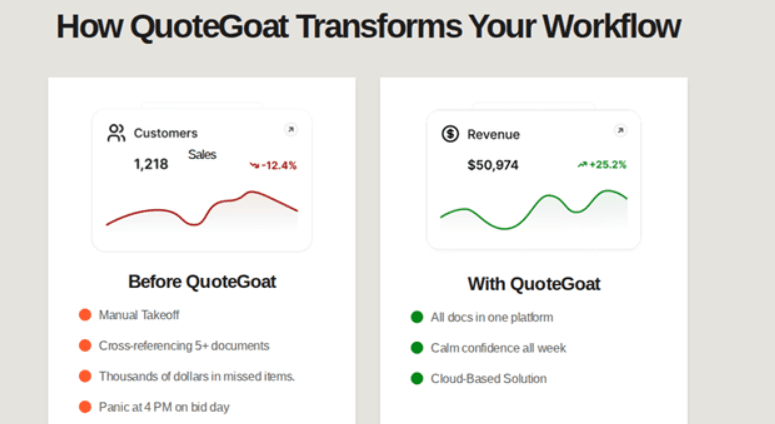
A modern estimating platform typically does three things well. It organizes your inputs, it suggests or structures line items and scope, and it helps you produce a client-ready output quickly. In some systems, AI assists with reading documents and identifying scope signals, then maps those into a consistent estimate format. In others, the AI focus is on proposal writing, scope clarity, and helping you not forget important items.
Even the best tools still rely on your expertise. Your pricing rules, production approach, and job conditions matter. If a tool produces a first draft estimate, you still need a review step where you confirm quantities, labor assumptions, and exclusions. The win is that you're editing a structured draft instead of building everything from scratch.
You should also know where these tools can struggle, especially during a trial period. If you watch for these issues early, you can avoid adopting a platform that creates hidden risk:
- Inputs are incomplete, and the tool can't infer missing scope reliably.
- Regional pricing doesn't match your supplier reality.
- Specialty trade assumptions are overconfident or too generic.
- Alternates, exclusions, and allowances are awkward to manage.
- Scope revisions don't track cleanly, leading to confusion in versions.
A good tool makes revisions easier and clearer. A weak tool makes revisions feel like retyping.
Best Estimating Software Categories In 2026
Contractors often waste time comparing tools from different categories. It's like comparing a pickup truck, a cargo van, and a forklift. Each can move material, but they're built for different jobs. Start by identifying which category fits your business, then compare tools inside that lane.
AI-first estimating platforms focus on speed, structure, and proposal-ready outputs. They're typically designed to help contractors quote faster, reuse consistent scope language, and reduce missed items. These are often a strong fit for service and remodeling contractors who need quick turnarounds and consistent quote formats.
Takeoff specialists focus more on drawings and quantities. They can be ideal if you do plan-heavy work and your bottleneck is measuring and quantifying, not writing scope or building proposals. They can also pair well with a quoting platform if your workflow is split between takeoff and sales.
All-in-one contractor suites include estimating plus scheduling, project management, or job costing. These can be attractive if you want one system, but they may require more setup and training. They also vary widely in how “smart” the estimating side actually is.
Proposal and sales tools may include AI writing support and templates, which can improve presentation, but they often lack deep estimating structure. They can still be useful if your estimating already happens elsewhere and your main need is client-facing clarity.
Where does QuoteGoat fit? The best approach is to evaluate it like an estimating-first quoting platform, then test how well it supports your actual estimating structure, revisions, and proposal needs. The category matters less than the outcomes you can prove during a trial.
How To Evaluate QuoteGoat For Your Estimating Workflow
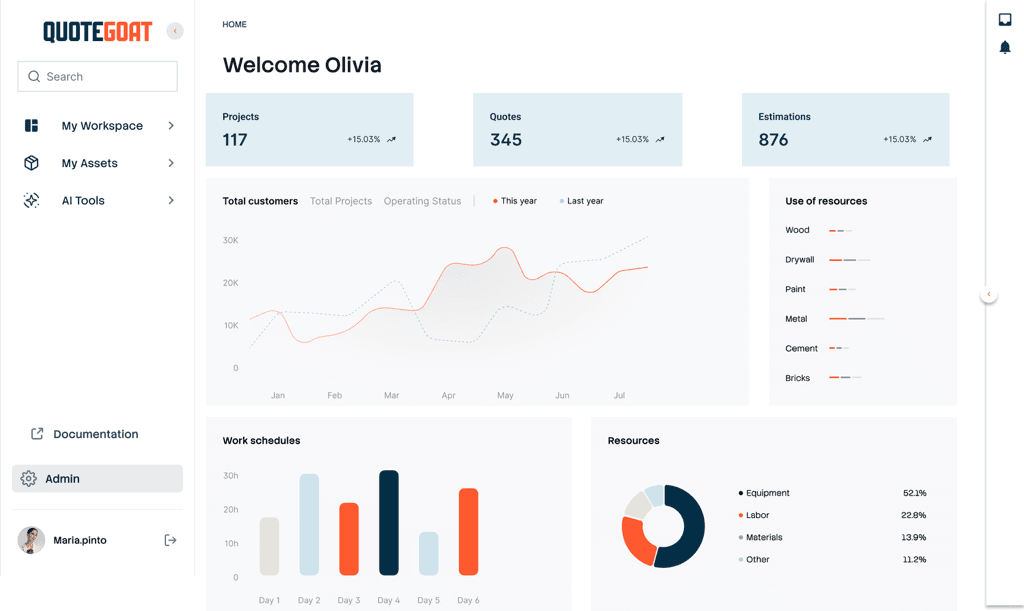
If QuoteGoat is on your list, treat the demo as a practical test, not a tour. Your goal is to confirm whether it helps you produce faster, clearer quotes that match how you build jobs. You’ll also want to see how the platform handles repeatable estimating patterns, because that’s where long-term time savings come from.
Start by bringing two or three real jobs. One should be simple and common, like the work you do every week. Another should include complexity, such as multiple alternates, allowances, and tricky exclusions. If the tool performs well on both, it’s a strong sign it can support your daily workflow.
Use these checkpoints during your evaluation, and ask for proof inside the platform:
- How quickly can you go from job details to a client-ready quote?
- Can you standardize scope language across multiple estimators?
- Does it help prevent missed line items and “oops” costs?
- Can you save assemblies and reuse them across similar projects?
- How does it handle exclusions, allowances, and alternates in writing?
- Can you show where numbers came from if a client challenges the price?
- What exports are available for spreadsheets, accounting, or job handoff?
- How are permissions handled for owners, estimators, and admins?
You’ll also want to evaluate how well it fits the rest of your stack. If you already use a CRM, job costing, or accounting tool, your estimate needs to move downstream cleanly. A great front-end quote that creates extra admin work later isn’t a win.
This is also where broader contractor-friendly tooling matters. Many businesses are adopting AI construction tools across marketing, scheduling, and admin work. Estimating is one of the highest ROI areas, but it has to connect to your actual operation.
A Simple Scoring Matrix Contractors Can Use
Comparing tools gets messy fast because every demo looks good. A scoring matrix keeps you honest and makes the decision easier. It also helps you gain buy-in from your team because the choice is based on results, not opinions.
Start with weighted categories. Speed matters, but accuracy and edit time matter more. A tool that generates a quick first draft is only helpful if you can revise it quickly and trust the structure. Adopt a simple 1 to 5 scale, then apply weights based on what matters most to your business.
Here's a practical set of categories to score:
- Speed To First Draft
- Edit Time And Revision Handling
- Scope Completeness And Clarity
- Pricing And Markup Flexibility
- Proposal Output Quality
- Team Adoption And Ease Of Use
- Integrations And Export Options
- Auditability And Version Control
- Support, Onboarding, And Training
- Total Cost Of Ownership
To run a fair test, standardize the inputs. Bring the same sample projects to each tool, and compare results side by side. Use the same pricing assumptions, and ask each vendor to show how edits are handled.
Bring these items to every trial:
- One set of plans or a detailed scope document.
- A past estimate you trust as a baseline.
- Your labor rates and burden assumptions.
- Your typical markup rules and contingency approach.
- A sample proposal format you like to send clients.
If a tool wins in the matrix but loses team confidence, don’t ignore that. Adoption is part of performance.

Cost, Pricing Models, And ROI In 2026
Most estimating platforms use one of three pricing models: per user, per project, or tiered packages based on features. None of these are “right” or “wrong,” but they affect how you scale. A small contractor might prefer a predictable monthly plan, while a high-volume estimator might care more about cost per bid.
The hidden costs are where contractors get surprised. Setup time matters, especially if you need to build assemblies, templates, and pricing tables. Training matters too, because an estimator who doesn’t trust the tool will avoid it. The good news is that a simple rollout can reduce both risks.
To measure ROI, keep it contractor-simple. Look at hours saved per estimate, win rate improvements from faster follow-up, and margin protection from fewer missed items. If you save two hours per estimate and you send ten estimates per week, you can do the math quickly. Add the profit impact of one prevented underbid, and many tools pay for themselves.
- Average time from lead to first quote.
- Number of revisions per job before approval.
- Missed scope items identified during production.
- Close rate changes on similar job types.
- Change order capture rate after scope shifts.
If ROI is unclear after a month, it usually means the rollout needs adjustment, not that the concept is bad.
A 30-Day Implementation Plan That Won't Disrupt Your Team
The fastest way to fail with new estimating software is to roll it out to everyone at once. Estimating is tied to sales, operations, and client expectations. If your team is confused for two weeks, you'll feel it in revenue and stress.
A better plan is phased. Start with one estimator or one owner who is motivated, and start with one job type. Build your base templates and assemblies around the work that makes you money, not the oddball projects you do once a year. As confidence grows, expand into more job types and more team members.
Focus on standardizing a few things early. This is where your long-term speed comes from:
- Line item naming conventions your team will stick with.
- Labor rate tables and burden assumptions that match reality.
- Allowance rules and clean exclusion language.
- Minimum margin rules and simple contingency guidelines.
- An approval step before a quote goes out the door.
Schedule a short weekly review during rollout. Talk about what's working, what's slowing edits, and what templates should be improved. If you treat this like a system you're building, not a tool you're buying, you'll get better results.
Common Mistakes Contractors Make With AI Estimating
The most common mistake is trusting outputs without a review step. Even great tools are only as good as the inputs and the assumptions you set. You're still responsible for labor, schedule reality, and job conditions. A tool should make that responsibility easier, not remove it.
Another mistake is skipping template setup. Contractors sometimes want instant results, then abandon the tool when the first estimate doesn't match their style. Templates and assemblies are where the long-term value lives, so invest the time early. The goal is repeatability, not a one-time quote.
Training is also underrated. If your estimator doesn't know how to edit quickly, they'll revert to old habits. Make training part of the rollout, even if it's short and practical.
- Estimates look polished but don't match how you build projects.
- Editing takes longer than starting from scratch.
- You can't explain pricing and scope clearly to a client.
- The team avoids using the tool after the second week.
- Exports and handoffs create extra admin work.
A tool should reduce friction. If it adds friction, it's not the right fit.
Join the QuoteGoat Waitlist And Tighten Up Your Estimating Workflow
If you want faster quotes, cleaner scope, and fewer missed items, start with a structured evaluation and a short trial. QuoteGoat may be a strong fit if it supports your repeatable templates, keeps revisions clean, and produces client-ready proposals without extra admin work. The key is to test it against real jobs and score it against the outcomes that protect margin.
If you're ready to move, check out QuoteGoat and Join the Waitlist so you can start using your own project examples and can see the workflow in action. If you'd like a second opinion on tool selection, implementation, or estimating workflow improvements.